


Check out the information below to learn how to utilize the Adoptions Made Easy (AME) system to easily track your K9 Cash throughout the year.
Log into AME and click on the Reports icon at the top of the page.
- Select the “Adoptions by Pet” on the drop-down menu in the upper-right corner.
To filter for Dog Only adoptions for the K9 Cash eligibility, use the filtering options below:
- Partner: Type in the name of your organization, click on the name that appears on the box, and then click Apply.
- Pet Type: To filter for dog adoptions that are eligible for K9 Cash bonuses, select Dog from the dropdown menu.
- Adoption Validated: Select Validated to display all completed adoptions.
- Adoption Start Date and Adoption End Date: Filter for specific dates by entering a start and/or end date for adoptions.



Monthly Cash Bonus: The Monthly Cash Bonus is based on incremental dog adoptions over the same time period in 2024. As an example, if a group did 50 adoptions in July 2026 and 45 adoptions in July 2025, the difference between 2026 and 2025 (50 – 45 = 5 incremental) would result in the group earning $500 (5 incremental dog adoptions x $100 per dog). We recommend running a report at the beginning of the month for 2025 dog adoptions, so you know what your baseline number is, then run the same report at the end of the current month in the current year to see how you did and determine what incremental dog adoptions you completed and are eligible for the bonus. Adoptions must be started and completed within the month to be considered eligible for K9 Cash rewards.
Helpful Tip: The reporting in AME defaults to 12 months so if you are unable to select the month last year or it’s grayed out, try changing the end date first, then you should be able to change the start date.
Useful Additional Reports:
Ongoing Transactions Report - This report lists all of the adoptions that have not been finalized and therefore are not eligible for incentives in their current state. Use this report to identify pending adoptions and finalize them as appropriate.
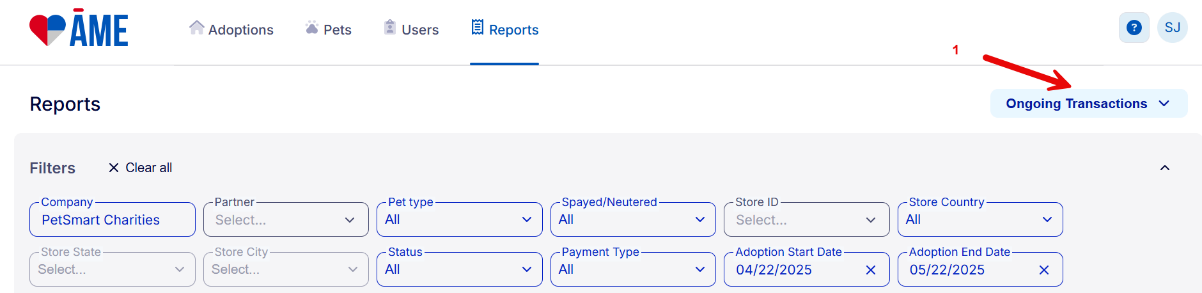
- To run the report, select Ongoing Transactions from the drop-down menu at the top right-hand side of the page. You can use any of the filters to find specific adoptions.
If you would like to download a report, click on the Download link at the bottom left-hand side of the page. When the download is complete, a notification will appear, and clicking on the Open Now link will convert the report to an Excel document that can be opened and saved for future use.
If you have any additional questions on using AME to track your K9 Cash-eligible adoptions, please feel free to reach out to adoptions@petsmartcharities.org.